Posts

Showing posts from 2024

Intune Company Portal App - New Look

Image
Intune Company Portal App - New Look

New WinPE for CrowdStrike - BSOD Fix

Image
  New WinPE for CrowdStrike BSOD Issue

Intune Cheat Sheet - 8

Image
  iOS Enrollment Ways

Intune Cheat Sheet - 7

Image
  Azure AD Connect - Concepts Explained 

Intune Cheat Sheet - 6

Image
  Device Enrollment

Intune Cheat Sheet - 5

Image
              Device compliance, Device Configuration & Conditional Access

Intune Cheat Sheet - 4

Image
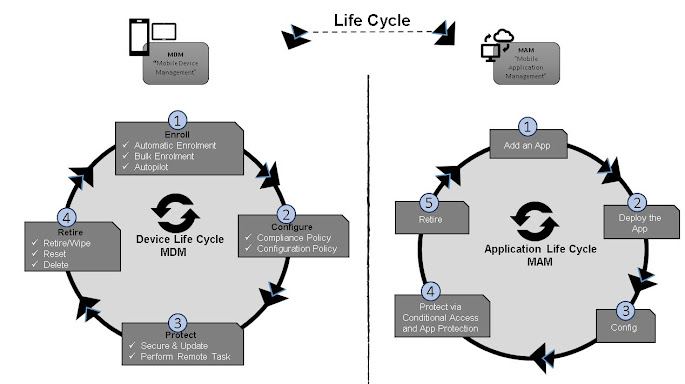
            MDM & MAM Lifecycle

Intune Cheat Sheet - 3

Image
License Requirement   

Intune Cheat Sheet - 2

Image
  Intune - Features

Intune Cheat Sheet - 1

Image
        About - Microsoft Intune  

Windows 11- 22 H2 - Count down Started for the End of Support

Microsoft has just warned Windows 11 users that if they’re not on the latest version of the OS, namely 23H2, then their installation will soon be out of support – meaning vital security updates will no longer be provided. In a 90-day reminder – which as the name suggests, comes three months in advance of support being dropped – Microsoft has let Windows 11 Home and Pro users know that soon enough, they’ll no longer be safe to stay on Windows 11 22H2. The exact date to mark in your calendar as the official end of support is October 8, 2024. Supported versions of Windows client | Microsoft Learn Furthermore, business (or education) users still on 21H2 (the first ever incarnation of Windows 11) will also be out of support (that deadline already passed for consumers; in case you were wondering).

Hello and Welcome to my Blog

Myself Ganapathy Natarajan – and I am working as an IT professional for the last 19+ years. My main focus has been design, operation, and support of Windows clients, with a particular focus on Intune, Autopilot, Cloud Management Gateway, SCCM, and package deployment. In line with the release of Windows 11, I have expanded my expertise in this new operating system and its integration with modern endpoint management solutions. Over the last 5 years, my focus has been on the transformation from traditional endpoint management to modern endpoint management. This includes Intune management, Windows 365 Cloud PC, Azure Virtual Desktop, and Mac management. With increasing demand across platforms and cloud-based solutions, I have worked to meet customers’ needs and expectations. Security is a central element in my work, and therefore it is a natural part of client projects that Microsoft Defender for Endpoint is considered and implemented. As the Zero Trust model has gained more attention as a...

Microsoft Intune Vs Windows Integrations - Table

Image
  

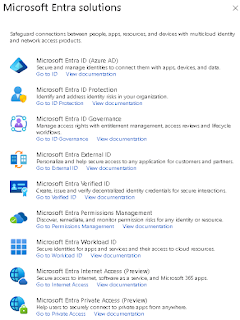
What is Microsoft Entra?

Image
Microsoft in  August 2023  started to replace the name for  Azure Active Directory  commonly known as  Azure AD  into  Microsoft Entra ID . Microsoft Entra  is more than just rebranding the  Azure AD , it’s a new  unifying brand  and  product family  for all  identity and network access solutions  There are  no changes  to any  Azure AD capabilities ,  APIs ,  login URLs ,  PowerShell cmdlets ,  Microsoft authentication library (MSAL) ,  developer experiences , or  tooling , only the  name is changing .  Azure AD Conditional Access  has become  Microsoft Entra Conditional Access ,  Azure AD MFA  has  become  Microsoft Entra MFA ,  Azure AD single sign-on  has become  Microsoft Entra single sign-on , and so on. Microsoft Entra  is as already mentioned a  product family name  for all  identity...

MECM Release Cadence - Changes

Image
 Microsoft has made significant changes to the release cadence of Microsoft Endpoint Configuration Manager (MECM), which will impact the frequency and timing of updates. Here are the key details based on the latest information: **1. New Release Cycle:**  After the release of a Configuration Manager baseline version in 2303, MECM is transitioning to a new release cycle, moving from three to  two updates per year.  This change is in alignment with Windows' move to a once-a-year update model, streamlining the update cadence to better align with Windows updates. **2. Impact on Update Frequency:**  Following this change, users can expect to receive two releases of Configuration Manager per year, with one in March (xx03) and another in September (xx09), instead of the previous release cadence of xx03, xx07, and xx11. This consolidation of updates will roll up enhancements into each release, reducing the number of deployments and providing more time for planning and te...

MECM CB 2309 Installation will not Progress - Fix

Image
MECM  upgrade to version 2309 gets stuck, here are some steps to troubleshoot and resolve the issue: MECM CB 2309 Installation will not Progress - Fix CMUpdateReset Tool : Use the CMUpdateReset tool to reset an in-console update with download or replication problems. You can run the following command: <SCCM Install Folder>cd.latest\\SMSSETUP\\TOOLS\\CMUpdateReset>CMUpdateReset.exe -FDELETE -S <your SQL Server> -D CM_1 -P <package GUID Replace <your SQL Server> with your SQL server name and <package GUID> with the package GUID ODBC Driver Version : Ensure that you have the ODBC driver for SQL Server version 18.1.0 or later installed. This is a prerequisite for Configuration Manager 2309 SQL Connection Properties : Modify the SQL connection properties by changing “Force Encryption” from “On” to “Off” if needed Network Adapters on Modern Standby Devices : If you’re experiencing unexpected wake-ups and DHCP requests, disable the “Allow Network wake-up” ...